Already a customer? Setup guides, troubleshooting, and FAQ are available.
Visit Help & Support →
For small business owners who are tired of guessing

Finally know
which jobs
make money.

MarginKit is a Notion template that computes your real margins — by job, by product, by month — so you stop flying blind on profitability.

Get MarginKit $47 once
One-time purchase. No subscription. Yours forever.
Know your margins · Track every job · Kill the spreadsheet · $47 once · Works in Notion · No subscriptions · Know your margins · Track every job · Kill the spreadsheet · $47 once · Works in Notion · No subscriptions ·
The problem

"We're doing $400k in revenue and I still export to Excel every month just to see if we're actually making money on each job."

— r/smallbusiness

"QuickBooks tells me I'm profitable. My bank account disagrees. I can't figure out which clients or jobs are the problem."

— r/smallbusinessowner

"I pay $49/month for accounting software and still do a manual spreadsheet to answer basic questions like 'which service makes us the most money.'"

— r/freelance

"Been in business 6 years. Still can't tell you our margin by job type. It's embarrassing. The tools make it too complicated."

— r/Entrepreneur

QuickBooks is for your accountant.
You need something for you.

What it is

A profitability OS.
Built in Notion.

MarginKit is a fully relational database system that lives in your Notion workspace. It connects your income, expenses, jobs, and products — and computes real margins automatically.

No code. No integrations. No monthly fee. Duplicate it into your workspace and start logging in 15 minutes.

💼
Job Margin Tracker

Link income and expenses to each job. Revenue, Direct costs, Gross margin, and Margin % compute automatically.

📊
Owner Dashboard

Active jobs board, unreconciled expenses, and monthly P&L — all on one page the moment you open it.

🧾
Receipt Inbox

Receipts flow in, get categorized, and link to expenses. Missing fields get flagged automatically.

📈
Monthly P&L Rollups

Each Reporting Month aggregates all income, expenses, net, and margin % for that period automatically.

🗓
Month-End Close Checklist

A 30-minute close process. Step by step. Link to filtered views that show exactly what's missing.

The math that
actually matters.

Everything connects. You log the data once — MarginKit computes the rest.

01
💸

Log Expenses

Mark direct costs. Link to jobs and months.

02
💵

Log Income

Link invoices to jobs, products, and channels.

03
🔗

Relations Fire

Rollups sum revenue and costs per job automatically.

04
📐

Margin Appears

Gross margin and Margin % compute in real time.

Margin % = (Revenue − Direct Costs) ÷ Revenue × 100
Computed automatically per job, per product, and per month. No formulas to maintain.

$47 once.
vs. everything else.

MarginKit
QuickBooks
Spreadsheet
Job-level margin tracking
Add-on
Manual
Auto-computed margin %
Breaks
Receipt inbox workflow
Monthly P&L rollup
Manual
Runs in Notion (no new app)
Monthly cost
$0
$35–$235
$0*

See it working.

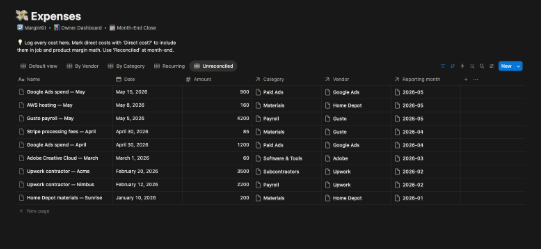
Every view is live and relational. This is what you open each morning.

📊 Owner Dashboard
MTD Revenue
$24,300
MTD Expenses
$9,100
Net
$15,200
Margin %
63%
💼 Active Jobs
Active
Acme Rebrand76% margin
Blue Sky Q2100% margin
Complete
Sunrise Rebrand97% margin
Lead
Northwind Gen0% margin
Plumbing Co100% margin
Owner Dashboard

MTD numbers, active job board, and unreconciled alerts — all in one view.

💼 Jobs / By Margin
97%
76%
27%
0%
Jobs By Margin

See instantly which jobs are profitable and which ones to stop taking.

📈 Reporting Months
83%
93%
-68%
Monthly P&L

Every month's income, expenses, net, and margin % — computed from your data.

Everything included.
Nothing to assemble.

🗄️

10 Relational Databases

Income, Expenses, Receipts, Jobs/Projects, Products/Services, Reporting Months, Channels, Customers, Vendors, Categories — all wired together.

📐

Auto-Computed Margins

Rollup formulas compute Revenue, Direct costs, Gross margin, and Margin % per job and per product. No formulas to maintain.

📊

Pre-Built Views & Dashboards

Board views, filtered tables, monthly rollups — every view you need is already configured and waiting.

🧾

Receipt Inbox Workflow

Receipts come in, get categorized, missing fields get flagged. A real workflow, not just a database.

���

Month-End Close System

A step-by-step checklist with linked views that show you exactly what's unreconciled and unclassified.

🧮

Pricing Calculator

Work backwards from target margin to required price. Enter your costs and target — the required sale price appears.

20 realistic seed rows so it looks populated immediately
Nav shortcuts on every page so you never get lost
Callout explanations on every database
FAQ page answering the 7 most common questions
Start Here onboarding — 15 minutes to your first numbers
Works with any Notion plan (Free or Plus)
✓ Mark Reconciled button — one click month-end
Yours forever — no subscriptions, no lock-in
Simple pricing

One price.
Forever yours.

No subscription. No tiers. No "basic plan" that's missing the good stuff. Just the full system, once.

$47
One-time · No subscription
Full MarginKit workspace
10 relational databases
Owner Dashboard
Job margin tracking
Receipt inbox
Month-End Close system
Pricing Calculator
FAQ + Start Here guide
20 seed rows included
All future updates
Get MarginKit for $47 →
🔒   14-day money-back guarantee  ·  Instant Notion duplication link
QuickBooks Online costs $35–$235/month and still doesn't answer "which jobs are profitable."
MarginKit answers that question on day one, for $47. Once.

Questions.

Does this sync with my bank or QuickBooks? +
No — and that's intentional. MarginKit is manual. You log transactions yourself. This keeps it simple, private, and free of integrations that break. It's not a replacement for QuickBooks — it's the operational profitability layer that QuickBooks doesn't have.
Do I need to know Notion? +
Basic Notion familiarity helps but isn't required. MarginKit ships with a Start Here guide that walks you through setup in 15 minutes. If you know how to type in a table and click links, you can use it.
What Notion plan do I need? +
The free Notion plan works for solo users. If you have a team, Notion Plus ($10/user/month) supports multi-member workspaces. MarginKit itself has no subscription.
Can I use this for multiple businesses? +
Yes. Duplicate the workspace once per business. Each copy is fully independent. One purchase covers all your use.
What if I'm not happy with it? +
14-day full refund, no questions asked. Email the address in your Gumroad receipt and you'll get your money back the same day.
How is this different from a spreadsheet template? +
Spreadsheet templates don't have relational data. When you link an expense to a job in MarginKit, the job's margin recalculates automatically. Spreadsheet formulas break when you add rows, reorganize, or share with anyone. MarginKit's relations are permanent — they can't break.

Stop guessing
which jobs
make money.

You built a business. You deserve to know if it's actually profitable — by job, by client, by month.

Get MarginKit — $47
14-day guarantee  ·  Instant access  ·  No subscription
Already a customer? Setup guides, troubleshooting, and FAQ are available.
Visit Help & Support →
MarginKit — Know your margins.
$47 once · no subscription
Get it now →